Cómo hacer un manual de instrucciones con IA desde fotos
Cómo hacer un manual de instrucciones con IA: convierte fotos de producto en dibujos lineales y pasos numerados en minutos, con revisión humana.
Si te preguntas cómo hacer un manual de instrucciones sin contratar a un ilustrador, la situación típica es esta: una pequeña marca de menaje de Valencia va a lanzar una picadora en Amazon.es. Las fotos de producto están hechas, la ficha está escrita y lo único que falta antes de enviar la mercancía son ocho figuras para el manual: cómo colocar el protector de la cuchilla, cómo bloquear la base, cómo limpiar la carcasa. El ilustrador freelance pide tres semanas. La fábrica se ofrece a «incluir un manual», que en la práctica suele ser una cuadrícula de fotos grises fotocopiadas.
Ese es el hueco que cubre hoy un generador de manuales con IA. No redacta el manual por ti: produce las figuras, que siempre han sido la parte más lenta y más cara.
Genera figuras de manual a partir de tus fotos de producto con el Generador de ilustraciones para manuales con IA: puedes empezar gratis.
Generador de manuales con IA: tres herramientas distintas con el mismo nombre
Cuando buscas «generador de manuales con IA» aparecen tres tipos de producto que no tienen nada que ver:
- Herramientas de texto que redactan el procedimiento: pasos, advertencias, texto estándar.
- Chatbots que responden preguntas sobre un producto.
- Herramientas de imagen que crean las figuras del manual.
La mayoría de lo que se vende como «generador de manuales de usuario con IA» es del primer tipo: parte del texto y te deja las imágenes a ti. Es útil, pero el texto nunca fue el cuello de botella; un redactor competente escribe ocho pasos en una hora. El cuello de botella eran las figuras.
ManualFig es del tercer tipo: parte de la figura. Empieza por la foto del producto, porque en un buen manual de instrucciones la imagen transmite la instrucción y el texto es solo el pie. El resultado no es un documento terminado, sino la capa visual del manual: figuras PNG y SVG que encajan en la maquetación que ya uses (InDesign, Word, Canva o la que sea). Lo natural es combinar: redacta el texto como prefieras, incluso con una IA de texto, y genera las figuras a partir de fotos. Si quieres el recorrido completo hasta el documento maquetado, la guía sobre cómo crear un manual de instrucciones con imágenes cubre la parte de maquetación, y el Generador de manuales de instrucciones con imágenes es la herramienta para ese flujo de principio a fin.
Qué hace bien la IA en un manual de instrucciones, y qué no
En 2026 la lista honesta de capacidades es concreta. La IA es realmente buena en:
- Convertir una foto en dibujo lineal. La fotografía se transforma en un dibujo de documentación limpio, línea negra sobre fondo blanco, conservando los contornos y eliminando el ruido. Antes eran horas de calcado vectorial por figura; ahora, minutos.
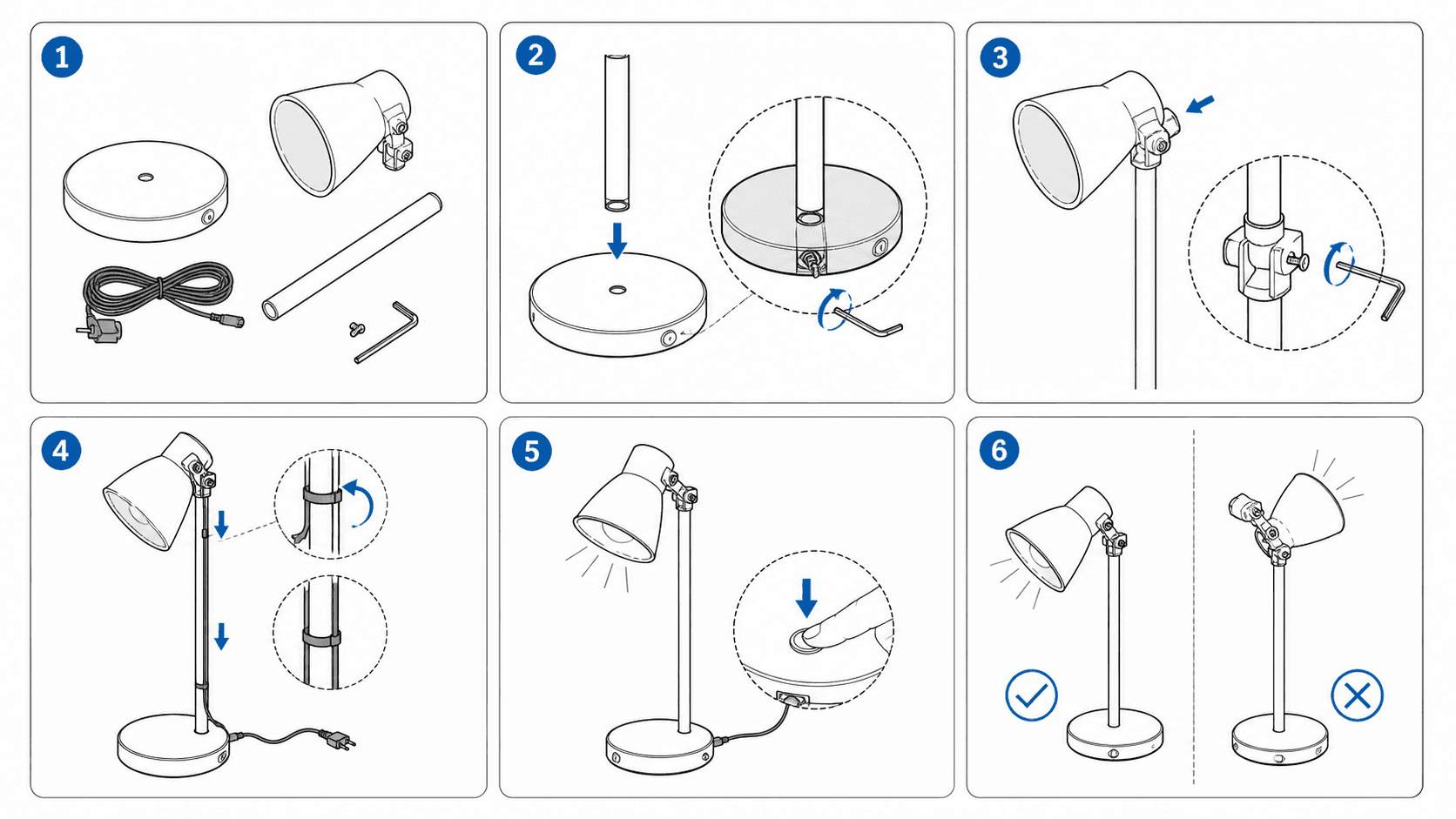
- Paneles de paso. Figuras que muestran una sola acción (una mano insertando un filtro, una flecha sobre un giro) con llamadas numeradas y el mismo estilo en toda la secuencia.
- El vocabulario visual del manual. Vistas generales de piezas de estilo despiezado, diagramas con globos, paneles de seguridad correcto/incorrecto, figuras de guía rápida, generados bajo demanda.
- Coherencia de estilo. Con una misma estructura de prompt, treinta figuras salen de una sola familia visual, justo lo que solía fallar cuando se subcontrataba un juego de figuras.
Y lo que no hace, dicho sin rodeos: la IA hace el borrador; la verificación la hace una persona. El modelo no conoce el par de apriete de tu producto, no sabe cuál de dos tornillos parecidos es el bueno ni que la pestaña tiene que hacer clic antes de cerrar la tapa. Dibuja lo que describen la foto y el prompt, y puede dibujar un error verosímil con total seguridad. Cada figura tiene que revisarla alguien que conozca el producto: número de piezas, orientaciones y que no aparezca nada inventado. Trata el resultado como el primer borrador de un ilustrador hábil pero muy literal.
Cómo hacer un manual de instrucciones con IA: foto → dibujo lineal → pasos numerados
El ciclo son tres movimientos, y es el mismo para una figura que para cuarenta.
1. Fotografía el estado que quieres mostrar. Cada figura tiene su propia foto de referencia: las piezas dispuestas, el conjunto en el paso 3, la mano en el cierre. Importan más la separación clara de las piezas y un ángulo sin ambigüedad que la iluminación. La foto no aparece en el manual; es la fuente de la que dibuja la IA.
2. Convierte la foto en dibujo lineal. La pasada de foto a dibujo lineal produce un trazado de calidad de documentación: líneas negras, fondo blanco, sin sombras ni texturas. Es lo que convierte el resultado en ilustración de manual y no en una foto con filtro: el dibujo lineal se imprime nítido a tamaño pequeño, aguanta la impresión a una tinta y se entiende al instante.
3. Añade la capa instructiva. Describe en el prompt la acción y las anotaciones: la flecha del movimiento, la llamada numerada, el círculo de detalle del tornillo, la pareja ✗/✓. Genera, compara con el producto físico, regenera lo que esté mal y exporta PNG para maquetación impresa o SVG si vas a editar los vectores después.
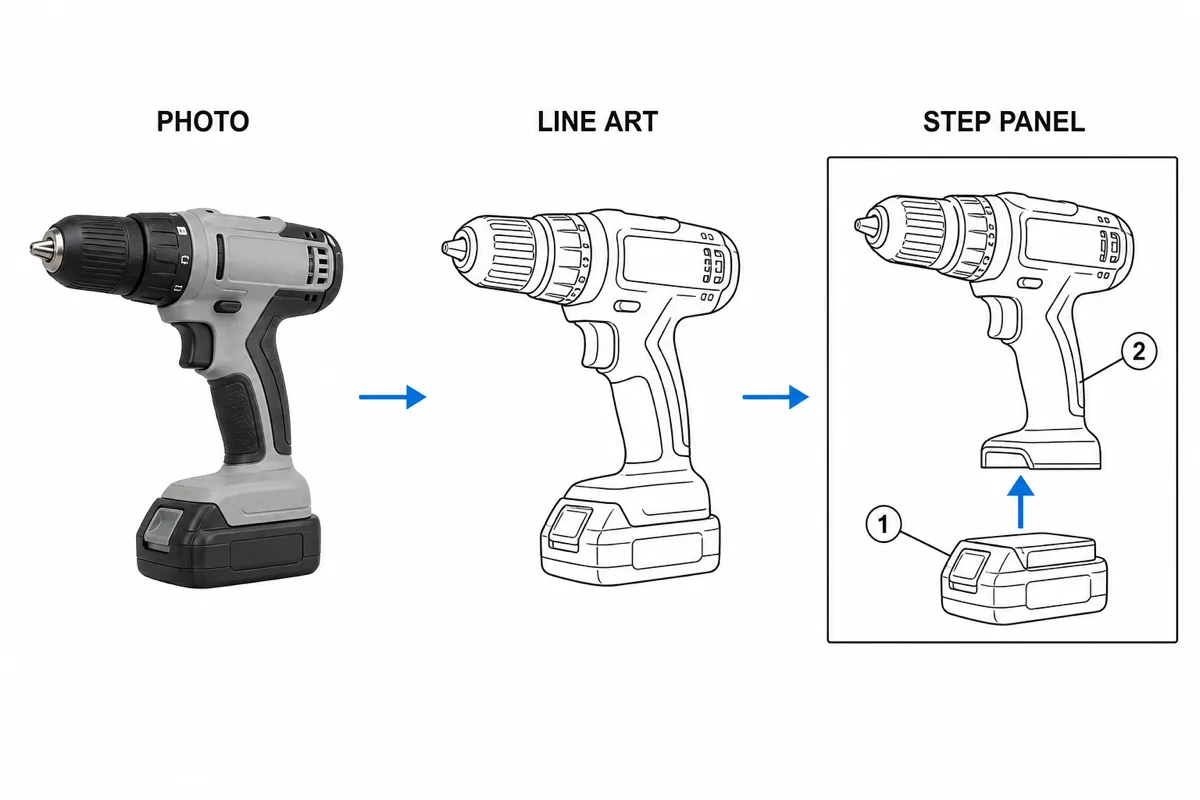
Usa un mismo esqueleto de prompt para todo el documento, de modo que cada figura herede el grosor de línea, el estilo de flecha y el formato de llamada. Esa coherencia es lo que hace que un conjunto de imágenes generadas se lea como un solo manual de instrucciones.
Para qué tipo de manual de instrucciones encaja hoy
- Manuales de producto de consumo. El caso principal: pasos de montaje, figuras de uso y paneles de limpieza y mantenimiento para productos cuyo CAD no existe o lo tiene un proveedor que no lo comparte. Vendedores de marketplace y marcas pequeñas son los que más lo usan, porque tres semanas de ilustración pueden decidir si lanzas este trimestre o el siguiente.
- Guías rápidas. La secuencia de cuatro paneles desembalar-instalar-conectar-listo, donde un dibujo limpio de estilo pictograma cabe en una sola tarjeta plegada.
- Instrucciones de trabajo. Figuras a nivel de puesto para la planta, con la misma gramática de dibujo lineal y llamadas, que se integran en el sistema documental de la fábrica.
- Borradores de figuras tipo IFU para revisión experta. En productos sanitarios y otros productos regulados, las figuras generadas con IA pueden servir como borradores que el equipo regulatorio y clínico revisa, corrige y valida por su proceso habitual. Que quede claro: generar una figura no otorga ninguna conformidad. La usabilidad, el etiquetado y los requisitos regulatorios son terreno de los expertos; lo que aporta la IA es tener un borrador visual revisable en minutos en lugar de semanas.
- Soporte y resolución de problemas. Las figuras de «cuál es el botón de reinicio» que ahorran idas y venidas en los tickets, generadas a partir de las fotos que soporte ya tiene.
Consejos de prompt que cambian el resultado
Unos pocos hábitos separan una figura de manual limpia de la típica ilustración genérica con IA:
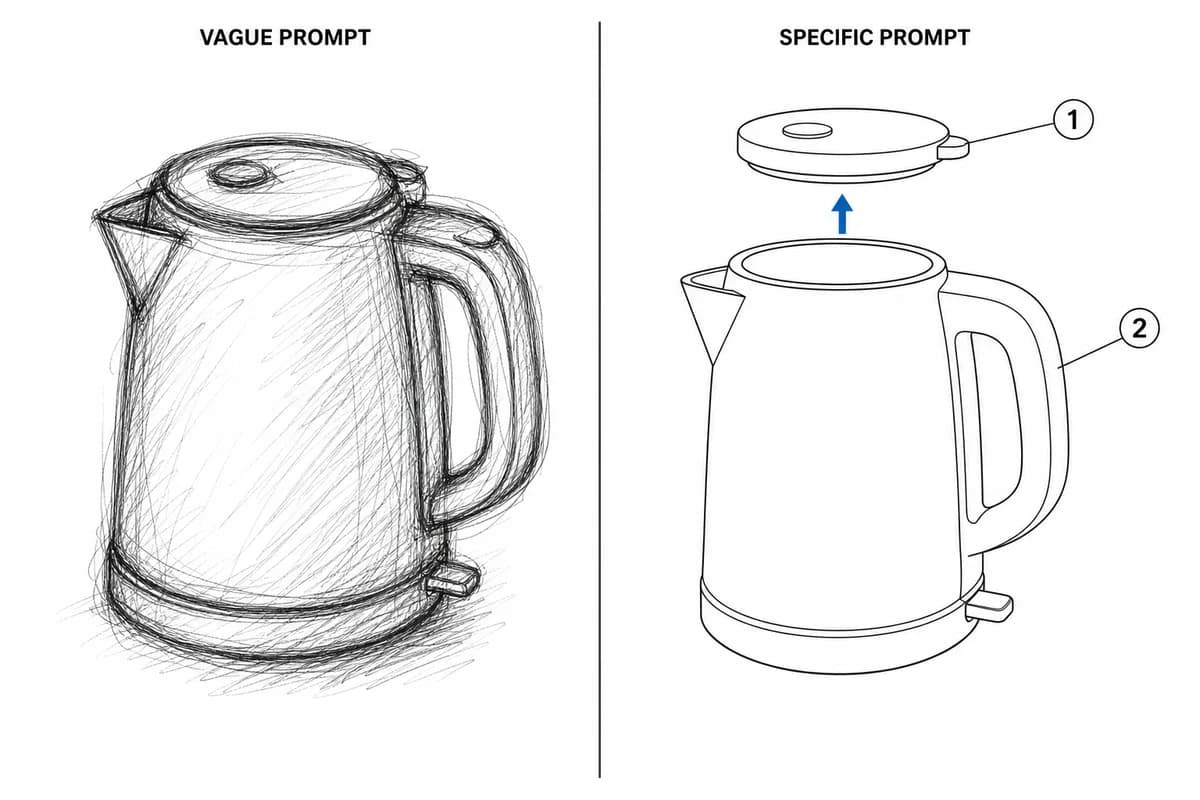
- Nombra el estilo en cada prompt. «Dibujo lineal negro y limpio sobre fondo blanco, sin sombras, sin logotipo, sin texto de marca», en todos los prompts, no solo en el primero. La deriva de estilo es el fallo más habitual.
- Una acción por prompt. Si describes dos acciones, el panel no mostrará bien ninguna. Divídelas igual que dividirías los pasos.
- Escribe las anotaciones en el prompt. «Flecha azul en la dirección de inserción, llamada numerada en el cierre, círculo de detalle en la cabeza del tornillo»: la capa instructiva se especifica, no se espera.
- Di lo que no debe aparecer. Ni texto inventado, ni piezas de más, ni números de modelo. Los modelos generativos rellenan el silencio con detalles; no les dejes silencio.
- Describe el estado final. «Tapa cerrada a ras, pestaña visible por la ventana» le da al modelo la condición de terminado y a tu revisor la lista de comprobación.
- Regenera, no te conformes. Una figura correcta al 90 % con el número de piezas equivocado es 0 % publicable. Iterar sale casi gratis: aprovéchalo.
Preguntas frecuentes sobre cómo hacer un manual de instrucciones
¿Puede la IA hacer el manual de instrucciones completo? Puede hacer borradores del texto y, sobre todo, de las figuras. Pero el contenido técnico (valores, secuencias, advertencias) lo aporta y lo verifica alguien que conozca el producto, y la maquetación la haces en tu herramienta habitual.
¿Necesito el archivo CAD del producto? No. El flujo parte de fotos normales del producto en cada estado que quieras mostrar.
¿En qué formato salen las figuras? PNG para maquetación impresa y SVG cuando necesitas editar los vectores o cambiar etiquetas más adelante.
¿Sirve para productos regulados? Solo como borrador para revisión experta. La conformidad la determina el proceso regulatorio de tu empresa, no la herramienta que dibuja las figuras.
Hacia dónde va esto
Lo que viene a corto plazo es poco vistoso y útil: más fidelidad a la foto de referencia, más control sobre dónde se colocan las llamadas y coherencia entre pasos resuelta automáticamente en lugar de a base de disciplina con el prompt. Lo que no cambiará es el reparto del trabajo: la IA produce las figuras rápido y una persona que conoce el producto da el visto bueno a cada una. No es una limitación de la que disculparse; es el flujo de trabajo. Las tres semanas del ilustrador se convierten en una tarde, y la revisión experta, que siempre importó, se sigue haciendo.
Empieza con las fotos que ya tienes: el Generador de ilustraciones para manuales con IA se puede probar gratis, y la primera figura te dirá más que cualquier comparativa.
Relacionado: Generador de manuales de instrucciones con imágenes, Foto a dibujo lineal para manuales, Cómo crear un manual de instrucciones con imágenes.
Autor

Investigador · University of Arts in Poznan
Davie Chen es investigador de la Facultad de Animación e Intermedia de la University of Arts in Poznan. Estudia la aplicación de IA generativa a figuras científicas, ilustraciones de patentes, gráficos de instrucciones y redacción académica. ManualFig AI es una de las herramientas surgidas de esta línea de investigación.
Ver perfil del autorCategorías
Más artículos
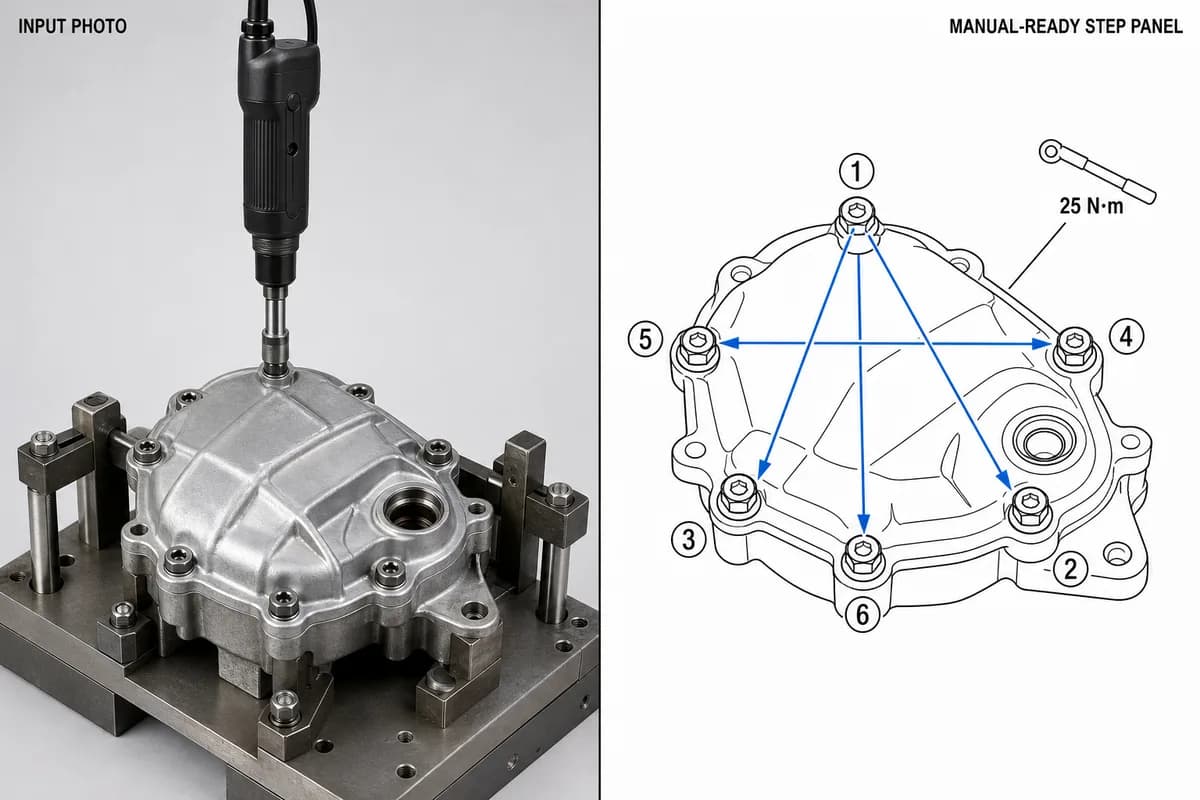
Instrucciones de montaje en fabricación: formato, ejemplos y cómo ilustrar cada puesto
Qué debe contener una instrucción de montaje de fabricación, cómo maquetar un paso por página, tres ejemplos de puesto resueltos (par de apriete, orientación, inspección) y una plantilla lista para copiar.
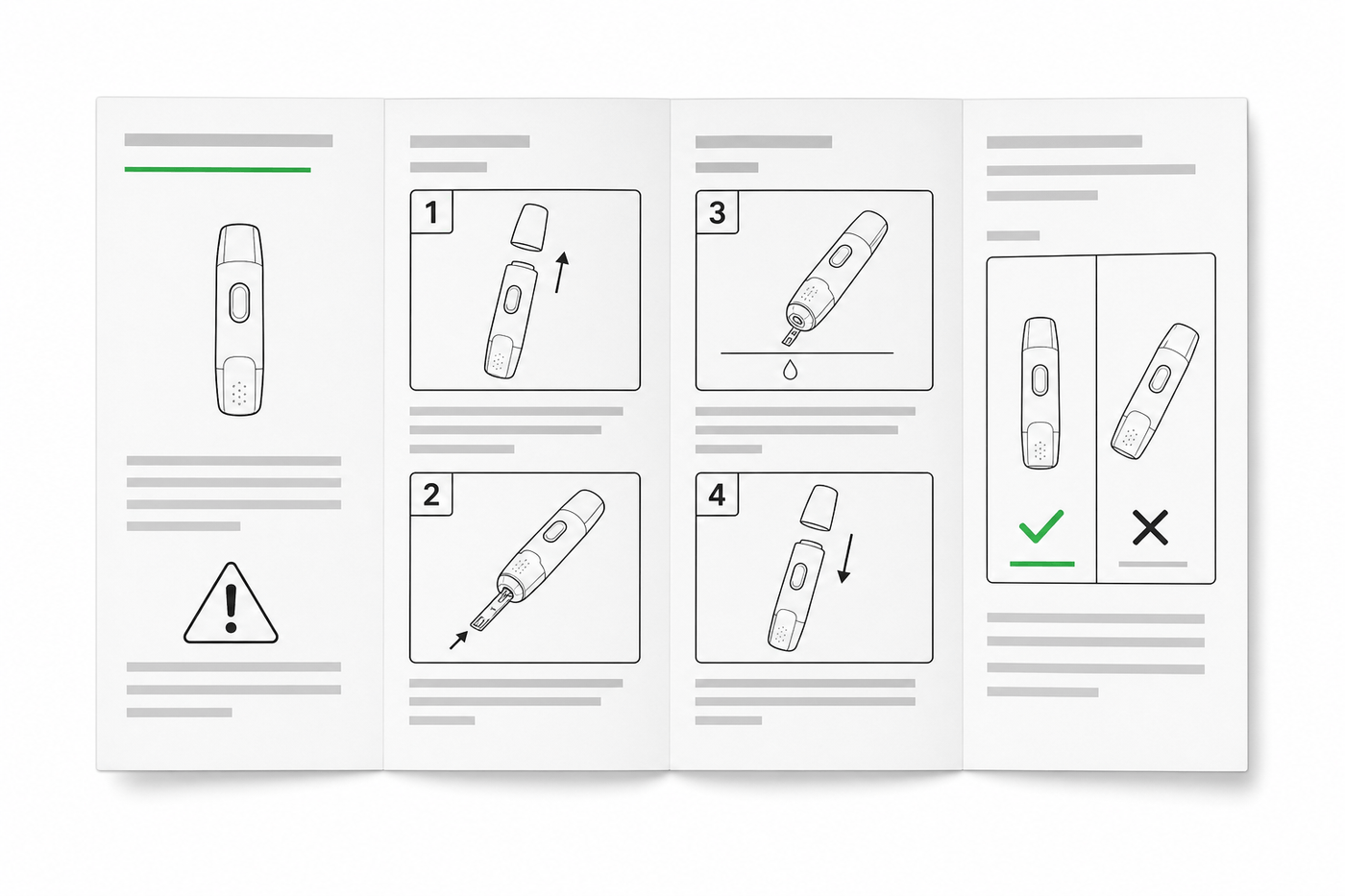
Diseño de IFU: maquetación, símbolos y ejemplos
Guía práctica para diseñar IFU de productos sanitarios: maquetación, símbolos ISO 15223-1, advertencias, ilustraciones y una estructura reutilizable.
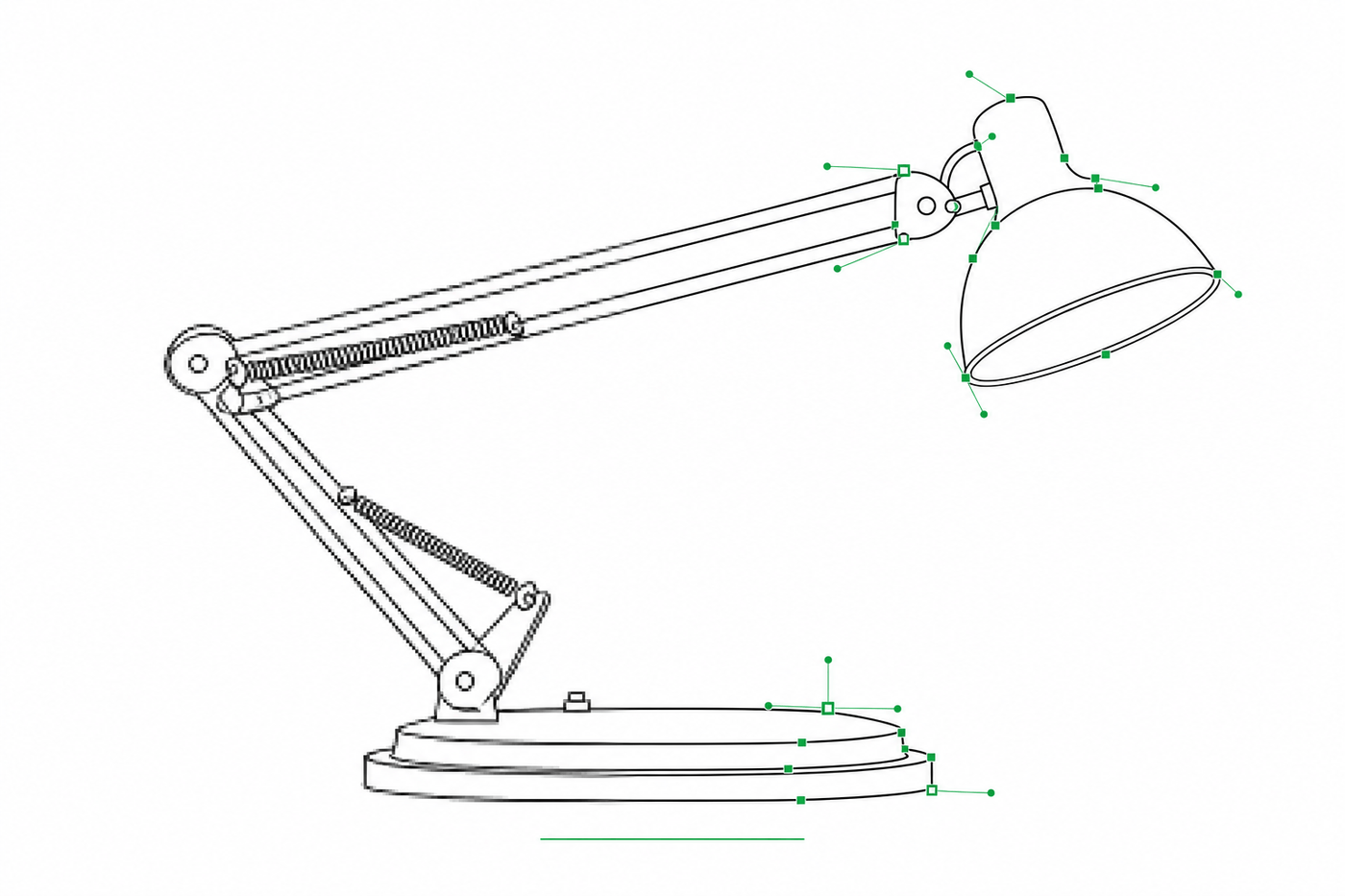
De imagen a SVG para Illustrator: cómo conseguir trazos editables en dibujo técnico
Por qué muchas conversiones de imagen a SVG llegan a Illustrator como contornos rellenos imposibles de restilizar, y dos flujos de trabajo que producen SVG basados en trazos (tipo centerline) con grosores de línea ajustables.