Medical Device IFU Illustration Generator
Create IFU-style visuals for medical device instructions
Generate clear use, preparation, placement, cleaning, disposal, and warning panels from device references and procedure drafts.
Medical IFU figure
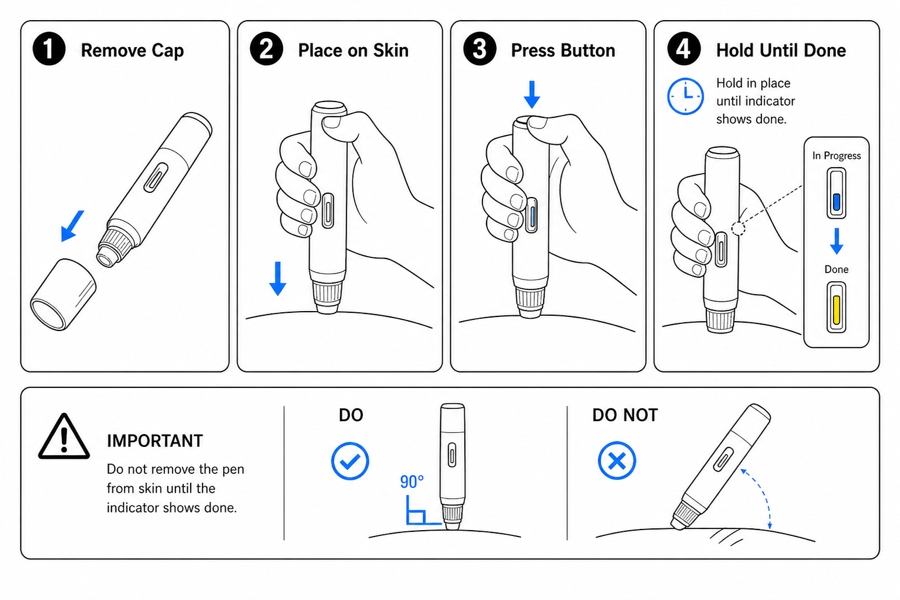 Example output
Output: manual-ready line art
IFU visuals ManualFig can draft
Use ManualFig to speed up IFU design and artwork exploration, then validate every instruction and claim through your review process.
Preparation and setup
Show cleaning, skin preparation, charging, component check, and setup sequence.
Use and confirmation
Illustrate placement, activation, alignment, final position, and successful completion.
Warnings and disposal
Draft forbidden actions, contraindicated handling, disposal steps, and risk-note visuals.
IFU panels need clarity before decoration
Medical device instructions often need simple visuals that support safe use and consistent review.

- Prompt: "Five numbered IFU panels from these photos: shake and uncap, exhale fully, seal lips and inhale, wipe mouthpiece weekly, dispose per local rules; add a do-not state for inhaling without sealing."
- Human review: a technical writer checked each action against the approved procedure; regulatory confirmed the warning wording before layout.
- Boundary: generated art only — no clinical, regulatory, or safety approval is implied.
From product reference to manual-ready output
ManualFig keeps the prompt, uploaded references, generated options, revisions, and exports in one browser workflow.
Upload or describe the product
Start from a product photo, CAD screenshot, sketch, existing manual page, or a short step list.
Generate the instruction visual
Create line art, numbered panels, arrows, callouts, detail views, warnings, and completion checks.
Refine and export
Select a result, revise it with text, keep versions together, and export PNG or SVG for documentation.
From device reference to reviewed IFU sequence
An IFU case that survives review follows the same path every time: reference photos in, a five-step draft out, then named humans checking every action, warning, and claim before anything ships.
The five-step spine
Preparation, placement, use, cleaning, disposal — each as one panel with one action and a confirmation cue.
Warning and incorrect states
Do-not panels and contraindicated handling drawn in the same style so reviewers compare like with like.
Human review checklist
Actions verified against the approved procedure, warning wording confirmed by regulatory, symbols checked against the applicable standard.
What ManualFig does not decide
ManualFig drafts the artwork. It does not produce clinical evidence, regulatory approval, or safety validation — those stay with your quality system.
Not a claims engine
Indications, contraindications, and performance claims come from your approved labeling, never from generation.
Not symbol authority
ISO 15223-1 and related symbols must be verified against the current standard before publication.
Not the reviewer
Every generated panel should pass your documented clinical, regulatory, and usability review before release.
Related ManualFig pages
ManualFig helps teams draft IFU visuals that are clean, repeatable, and ready for human review before publication.
Medical Device IFU Illustration FAQ
Can ManualFig create medical device IFU illustrations?
It can draft IFU-style visuals from device references and procedure text. Teams should still validate the result through clinical, regulatory, and safety review.
Can I use product photos as references?
Yes. Device photos, CAD screenshots, sketches, and existing IFU pages can guide the generated panels.
Can ManualFig add regulatory symbols?
It can include requested warning or instruction cues, but official symbols and regulated claims must be verified before publication.
Is this only for wearable devices?
No. The same visual workflow can support disposables, diagnostics, personal care devices, accessories, cleaning steps, and training materials.
Draft an IFU visual sequence
Start from a device reference and procedure draft, then generate visuals for review.